

So after using Unity across so many versions over the years, I can say with some confidence that Unity has had a rough few years in the public eye. Between the runtime fee debacle and general feelings of stagnation, a lot of developers started eyeing the exits. But quietly, something interesting has been happening on the technical side, and I think it's worth talking about.
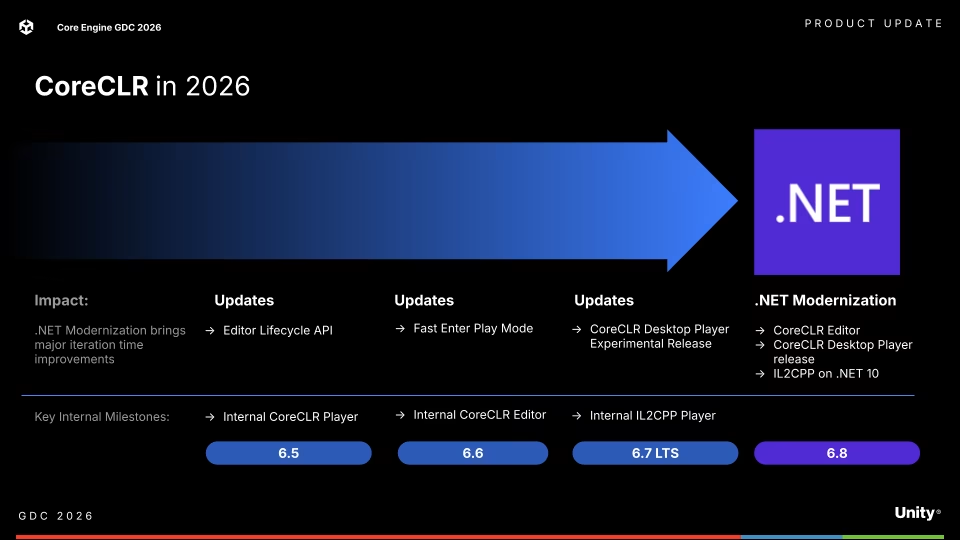
Over the course of 2026, Unity is making a pretty significant architectural change to how C# runs under the hood. The short version: Mono is out, CoreCLR is in. By the time Unity 6.8 ships, Mono won't even be an option anymore.
For anyone reading this that is new to Unity, Mono has been Unity's scripting backend for a long time - handling C# compilation and execution at runtime. Things evolved a bit when IL2CPP was introduced, which transpiles your C# IL bytecode into C++ and then compiles that down to native code for better performance and platform compatibility. But Mono remained the default development backend, the thing actually running your code in the editor and in non-IL2CPP builds. That's what's going away.
🔧 What Is CoreCLR, and Why Should You Care?
Right now, Unity uses Mono as its scripting runtime, it's the thing that actually runs your C# code. Mono has been around forever and served Unity well, but it's showing its age. CoreCLR is the modern .NET runtime from Microsoft, the same one powering .NET 8, 9, 10 and beyond. It's faster, better maintained, and gets all the modern language and performance improvements first.
The switch isn't expected to be a dramatic performance leap on day one. Unity have been pretty upfront that Unity 6.8 is aiming for parity, not a night-and-day difference. Some things will be faster, some things might be slightly slower, roughly a wash overall. But the important thing is that this sets the foundation for improvements that weren't possible with Mono.
📅 The Rollout
Unity are doing this gradually across the 6.x releases, which is the sensible approach:
- 6.5 - Internal CoreCLR Player milestone, Editor Lifecycle API lands
- 6.6 - Internal CoreCLR Editor, Fast Enter Play Mode becomes the default for new projects
- 6.7 LTS - Internal IL2CPP Player, CoreCLR Desktop Player experimental release
- 6.8 - The big one. CoreCLR Editor, CoreCLR Desktop Player full release, IL2CPP on .NET 10. Mono is gone.
⚡ Fast Enter Play Mode - Now Mandatory
Fast Enter Play Mode has been an opt-in feature since Unity 2019. It speeds up entering play mode by skipping expensive reload steps, but it requires you to be more explicit about initialisation and cleanup in your code. In 6.6 it becomes the default for new projects. In 6.8, it's the only option.
If your project has any static state that relies on being automatically reset between play sessions, you'll need to handle that yourself using the new Editor Lifecycle API. Unity provide some attributes to make this fairly mechanical:
// Reset static state before code unloads
[Unity.Scripting.LifecycleManagement.BeforeCodeUnloading]
static void Cleanup() {
    // Reset your static variables here
}

// Or let Unity do it automatically
[AutoStaticsCleanup]
private static MyThing _instance;
Unity recommend running the Project Auditor tool (installable back to Unity 6.0.0) to find anything in your project that'll need attention before you upgrade.
🧪 .NET 10 - What's Actually Changing
Unity 6.8 will ship with a .NET 10 toolchain. This is the only target framework you'll get - no more .NET Standard 2.1 or .NET Framework 4.7 targeting. If you've got precompiled assemblies targeting anything other than .NET Standard 2.1, those may break.
A few things worth knowing about the .NET 10 changes specifically:
Floating point behaviour - CoreCLR is fully IEEE 754 compliant. If you've got any code that does a lot of floating point maths and relies on specific results, it's worth testing. IL2CPP builds and Burst-compiled code are not affected.
BinaryFormatter is gone - Well, not gone, but it's been marked obsolete and you really should have stopped using it already. If you haven't, Unity suggest migrating to JsonUtility, System.Text.Json, or BinaryReader/BinaryWriter depending on your use case.
Static constructor timing has changed - Static constructors now run when a type's data is first accessed, rather than when methods are first JIT compiled. In practice this probably won't affect most projects, but if you're relying on a specific initialisation order, it's something to be aware of.
Stricter type access enforcement - CoreCLR is more strict about access modifiers at runtime. If anything in your project uses reflection trickery or relies on Mono's more lenient behaviour around private/internal access across assemblies, you may see MethodAccessException in places you didn't before.
Overflow checks in system types - Various conversion methods now throw OverflowException in cases that previously silently did the wrong thing. For example, IntPtr.ToInt32() on a 64-bit platform will throw rather than silently truncate. Generally a good thing, but it may surface bugs you didn't know you had.
🔄 Static Variables and Code Reload
This one's a bit of a shift in how Unity manages your code. Previously, Unity would unload and reload the entire managed code space when you entered/exited play mode. That meant static variables got wiped automatically. That's no longer the case.
It also means you need to be careful about container types that don't clear unused storage. A custom stack backed by an array, for example, might hold references to old objects even when logically empty - which can block garbage collection and prevent assemblies from unloading properly. The fix is straightforward:
// Make sure Pop() actually clears the reference
public T Pop() {
    T result = _storage[--_count];
    _storage[_count] = default(T); // Clear the reference
    return result;
}
Standard .NET containers already handle this correctly. It's mainly custom implementations and lower-level stuff like System.Buffers.MemoryPool<T> that you'll need to watch out for.
🤔 Is This Actually Good News?
I think so, yeah. The honest version is that Unity 6.8 itself probably won't feel dramatically different on day one - they've said as much. But moving to CoreCLR means Unity is now on the same runtime as the rest of the modern .NET ecosystem, which means they can actually benefit from the ongoing improvements Microsoft is making. Faster JIT compilation, better memory management, newer language features - all of that becomes accessible in a way it just wasn't with Mono.
One thing worth noting - Unity have been transparent that while moving to CoreCLR makes upgrading to future .NET versions much easier down the road, they currently have no concrete vision or roadmap to do so beyond .NET 10. What comes after that is very much a "we'll see" situation. So the foundation is there, but don't go expecting .NET 12 or 14 support to be announced any time soon.
Whether Unity can capitalise on this technical foundation and win back some of the goodwill they've burned is a different question. But at least the engine is pointed in the right direction.
- Sloth